
Book Your Digital Fabrication Slot on ORB
LateBook ArrivalYour Digital Fabrication Slot on ORB
Before using any Digital Fabrication Lab equipment, you must book an equipment slot on ORB.
ORB bookings help us manage machine availability, identify users, and No-showmake Policysure the lab is used safely and fairly by inducted students.
You can access ORB here:
https://orb-arts.siso.co/ui/scan-to-book.php
For general ORB booking guidance, please refer to:
Reminders
If You Cannot Make a Booking
PleaseIf thinkyou cannot make a booking, your account may be blocked, or you may not have completed the required induction.
If your account is blocked, please contact our Kit Room technician.
If you have not completed the relevant induction, please check the previous page:
Access, Rules and Health & Safety
Important Induction Reminder
Machine inductions usually take place at the start of ORBthe equipmentacademic bookingsyear, not in athe similarmiddle wayor toat restaurantthe bookings.end of the year.
For 3D printing, inductions usually take place between September and March.
If you have not completed the relevant induction, you cannot operate the machine yourself.
You may stillask beanother ableinducted CCI student to useprint aor machinefabricate withoutfor ayou, bookingbut ifthey itmust is available. However, if another student has booked that machine, you may be asked to finish and leaveoperate the machine byat all times.
Uninducted students must not operate the startmachines timethemselves ofor theiraccess booking.
Forlab this reason, it is important to estimate how much time you need as accurately as possible before booking a slot.alone.
What Your Booking Covers
Your ORB booking reserves the machine time only.
It does not automatically include:
- Technician supervision
- One-to-one tutorials
- File preparation support
- Troubleshooting support
If you need a tutorial or additional support, please speak to a technician at least two working days in advance so we can check availability and arrange a suitable time.
You can still come in without arranging support in advance, but if the technicians are busy, you may need to wait or come back another day.
Please note: Walk-in support and tutorials cannot always be guaranteed, especially during busy periods.
How to Book a Digital Fabrication Slot
1. Open ORB
Go to:
https://orb-arts.siso.co/ui/scan-to-book.php
2. Search for “Digital Fabrication”
Use the search bar and search:
Digital Fabrication
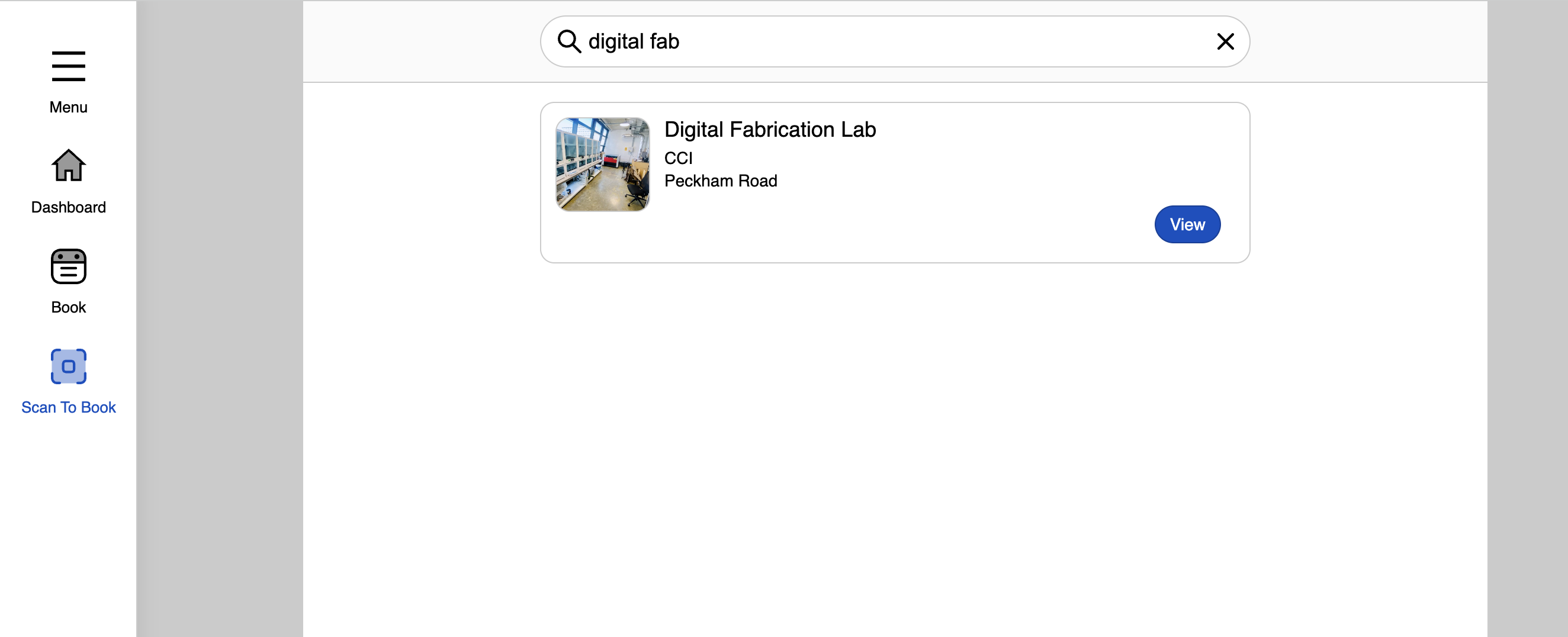
3. Alternative Booking Route
You can also book through the standard ORB menu:
ORB → Simple Booking → Make Bookings → Space Booking
Then search:
Digital Fabrication
4. Select the Correct Equipment Slot
Select the correct machine or equipment slot you need.
Make sure you are booking the correct machine and the correct time.
Booking the Correct Amount of Time
Before booking your slot, please estimate how long you need as accurately as possible.
For 3D printing, you must slice your model first and check the estimated print duration in the slicer.
Your booking should cover:
Estimated machine time + preparation / setup time
For 3D printing, we recommend adding approximately 20 minutes of preparation time to your estimated print duration.
For example:
| Estimated Print Time | Recommended Booking |
|---|---|
| 45 minutes | Book at least 1 hour 15 minutes |
| 2 hours 20 minutes | Book around 2 hours 45 minutes to 3 hours |
| 5 hours 10 minutes | Book around 5 hours 30 minutes to 6 hours |
Please do not book a short slot for a long job.
If Youyour Arejob Lateis still running after your booking has ended, it may affect other students who have booked the machine after you.
Naming Your Job
Each machine job must be clearly named so technicians can identify the user if there is a problem.
For 3D printing, your print job should include:
- Your Slack name
- Your project or file name
- A version number if needed
Example:
@yuweichen_final_project_test_01
Jobs may be cancelled if:
- The user cannot be identified
- The job does not include the correct name or notes
- The machine is used without a valid booking
- The booking does not match the student using the machine
Arrival Time
Please arrive at least 10 minutes before your booking.
This gives you enough time to:
- Prepare your file or print
- Check the machine
- Check the material setup
- Ask for a quick file check if a technician is available
- Start your job on time
If you need technician support, please message a technician one to two working days before you need to use the machine.
Walk-in support cannot be guaranteed.
Late Arrival and No-show Policy
Please think of ORB equipment bookings in a similar way to restaurant bookings.
You may still be able to use a machine without a booking if it is available. However, if another student has booked that machine, you may be asked to finish and leave the machine by the start time of their booking.
For this reason, it is important to estimate how much time you need as accurately as possible before booking a slot.
If you aredo morenot thanarrive within 15 minutes late,of your booked start time, your booking may be cancelled and the machine may be released for walk-in use.
If you know you are going to be late, please contact the technical team in advance. Where possible, we may be able to hold your booking for up to 30 minutes.
Please note: This cannot always be guaranteed and will depend on machine availability, staff availability, and how busy the lab is.
Why This Policy Matters
This policy may not make a big difference during quieter periods. However, during busy times, especially around assessments and deadlines, it helps students avoid waiting repeatedly without being able to use the machines.
Please be considerate of other students and only book the amount of time you realistically need.
Bambu H2D Pro Printer Slots
The Bambu H2D Pro printers are for experienced and approved users only.
They are not general access machines.
For Bambu-specific access requirements and booking rules, please refer to: