
Workshop: Using Data in PEmbroider
Using p5.Embroider, we can use data imported from a csv file to create embroidered data representations.
1. Import .csv file
To do this, we need to create a table variable and load the data from the .csv into it.
let table;

function preload() {
  table = loadTable('wind.csv', 'header');
}
For this example to work, the .csv file must be saved in the same folder as the p5 file you are working in.
2. Access Data from Table
For this example, the structure of the csv file is as below.
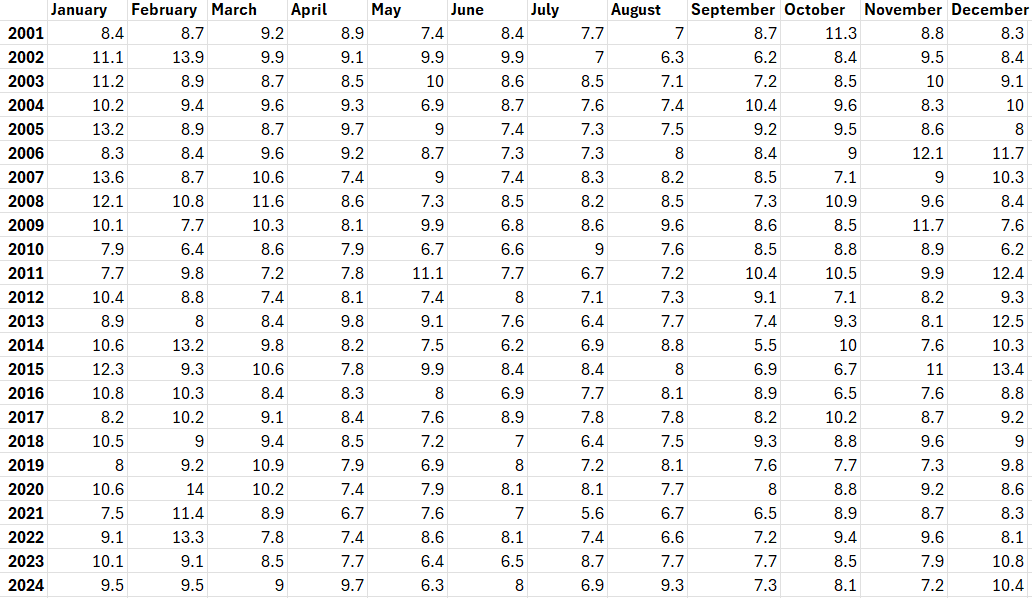
To access each value within the
We can use .getRows() and a for-loop to iterate through the rows of the table. Then, .getNum() can be used to access each value within the row. .getNum() takes either an index or the name of the column (e.g. .getNum(0) or .getNum('January'))
  let tableRows = table.getRows();

  for (let row of tableRows) {
    for (let i=0; i<table.getColumnCount()-1; i++){
      console.log(row.getNum(i));
    }
  }