
Workshop: Data Representation with p5.embroider
Using p5.embroider, we can use data imported from a csv file to create embroidered data representations.
Wind Speed Example
Below, you can see a pattern created using a sample of wind speed data. Each vertical line represents one year and each sine curve going down shows a month. The more exaggerated the curve, the higher the average wind speed was for that month.
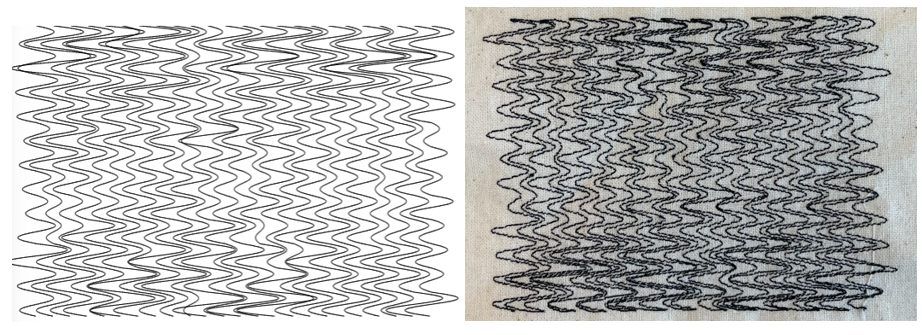
In order to achieve something like this, there are two steps we need to take.
1. Import .csv file
To do this, we need to create a table variable and load the data from the .csv into it.
let table;

function preload() {
  table = loadTable('wind.csv', 'header');
}
The header argument indicates that the table has column headers so should be removed if it doesn't.
2. Access Data from Table
For this example, the structure of the csv file is as below.
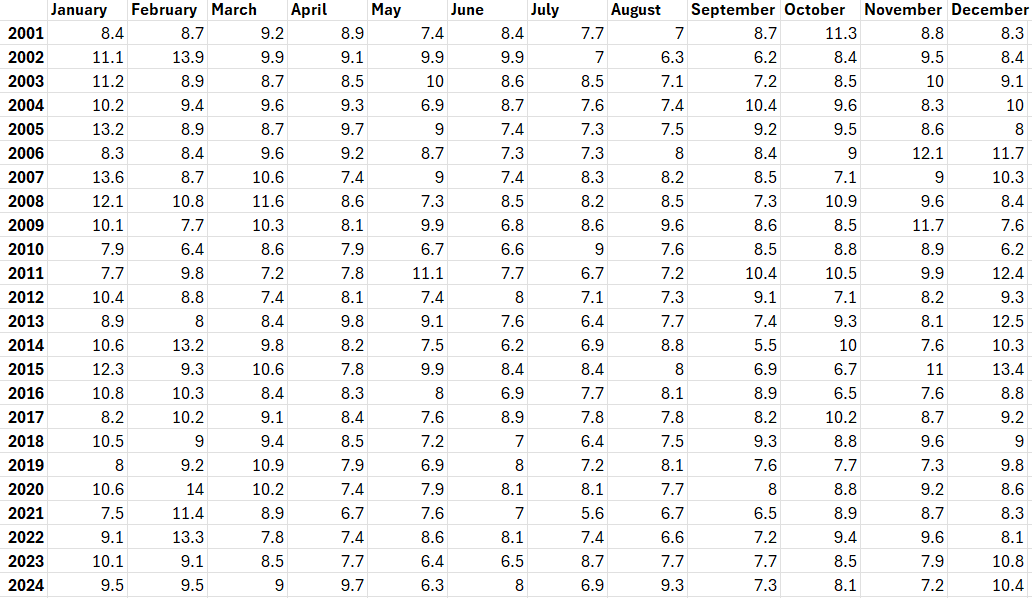
We can use .getRows() and a for-loop to iterate through the rows of the table (the years, in this case). Then, .getNum() can be used to access each value within the row. .getNum() takes either an index or the name of the column (e.g. .getNum(0) or .getNum('January'))
  let tableRows = table.getRows();

  for (let row of tableRows) {
    for (let i=0; i<table.getColumnCount()-1; i++){
      console.log(row.getNum(i));
    }
  }