
Workshop: Using Data in PEmbroider
comingUsing soon...
Belowdata isimported the standard startup, drawing, and export forfrom a non-loopingcsv sketch which we will add to.
// Example PEmbroider program
import processing.embroider.*;
PEmbroiderGraphics E;

void setup() {
  size(800, 600);
  E = new PEmbroiderGraphics(this, width, height);
  String outputFilePath = sketchPath("filename.dst");
  E.setPath(outputFilePath);

  E.beginDraw();
  E.clear();

  //-------
  // Content goes here
  //----------

  // Visualization and export:
  // NOTE: Leave optimize() and endDraw() commented out,
  // until you are readyfile to exportcreate theembroidered embroiderydata file!
  // Don't forget to un-comment them when you want to export!
  //
  // E.optimize(); // VERY SLOW, but essential for file output!
  E.visualize();   // Display the embroidery path on-screen.
  // E.endDraw();  // Actually writes out the embroidery file.
}
1. Import .csv file
To do this, there are only two lines of code that we need to add.create First,a we need to set up our table variable beforeand load the setupdata function.from the .csv into it.
Tablelet table;
Then,preload() within{
setup(), we can import our data.
table = loadTable("'wind.csv"csv', "header"'header');
}
For this example to work, the .csv file must be saved in the same folder as the processingp5 file you are working in.
2. Access Data from Table
For this example, the structure of the csv file is as below.
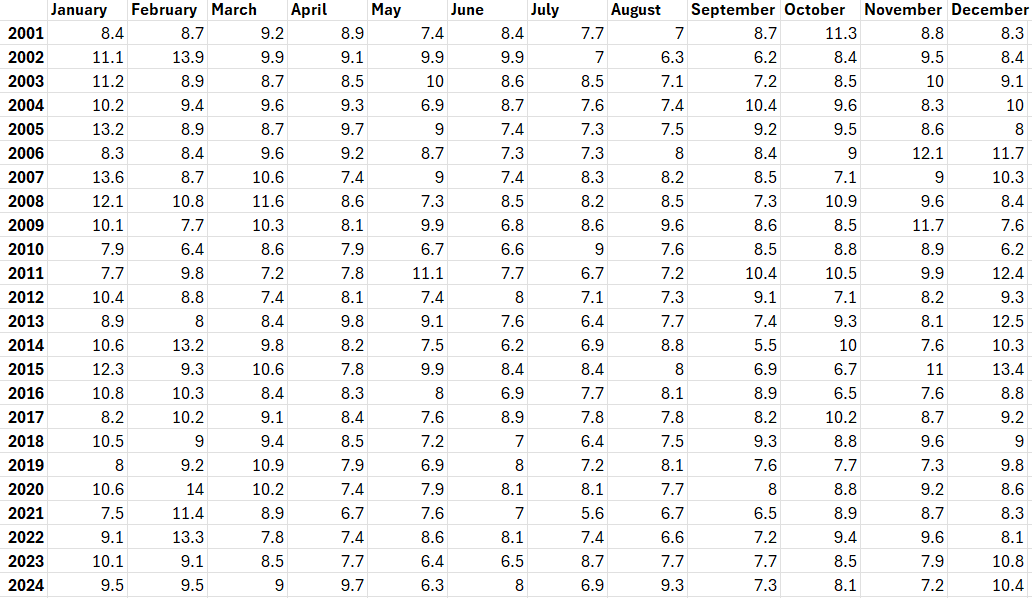
To access each value within the
We can use .getRows() and a for-loop to iterate through the rows of the table. Then, .getNum() can be used to access each value within the row. .getNum() takes either an index or the name of the column (e.g. .getNum(0) or .getNum('January'))
  let tableRows = table.getRows();

  for (let row of tableRows) {
    for (let i=0; i<table.getColumnCount()-1; i++){
      console.log(row.getNum(i));
    }
  }